As you know ADs shows up in either popups or inside game screen which can take time in between rounds and can be annoying....
Saturday, January 5, 2019
How to play android games without ADs

Saturday, December 1, 2018
How to re-enable adminpldt account on PLDT Home Fibr router
The images below demonstrate an unavailable adminpldt account, so settings are limited.


The reason that we need to enable adminpldt account is to fully manage our fibr router such as Port Forwarding, Wifi settings and more.
Here are the steps to re-enable adminpldt account:
1. Browse http://192.168.1.1/fh
2. On Administrator field, enter: fiberhomesuperadmin
3. Then on Password field, enter: sfuhgu
4. Then click Login button
5. Click Debug Switch Menu
6. Switch On (Enable radiobutton) Web Admin Switch
7. Click Apply button
8. Click Logout link
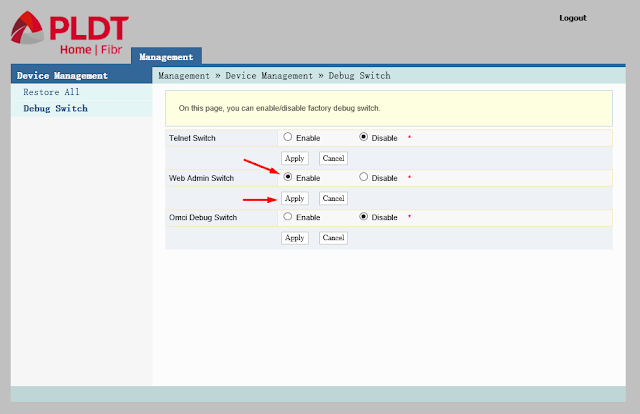
9. On Administrator field, enter: adminpldt
10. Then on Password field, enter: 6GFJdY4aAuUKJjdtSn7dC2x
11. Then click Login button.
12. After enabling Web Admin Switch, just browse http://192.168.1.1/fh
The steps will not persists on power off.
Proof that it works...


The reason that we need to enable adminpldt account is to fully manage our fibr router such as Port Forwarding, Wifi settings and more.
Here are the steps to re-enable adminpldt account:
1. Browse http://192.168.1.1/fh
2. On Administrator field, enter: fiberhomesuperadmin
3. Then on Password field, enter: sfuhgu
4. Then click Login button
5. Click Debug Switch Menu
6. Switch On (Enable radiobutton) Web Admin Switch
7. Click Apply button
8. Click Logout link

9. On Administrator field, enter: adminpldt
10. Then on Password field, enter: 6GFJdY4aAuUKJjdtSn7dC2x
11. Then click Login button.
12. After enabling Web Admin Switch, just browse http://192.168.1.1/fh
The steps will not persists on power off.
Proof that it works...


Subscribe to:
Posts (Atom)